

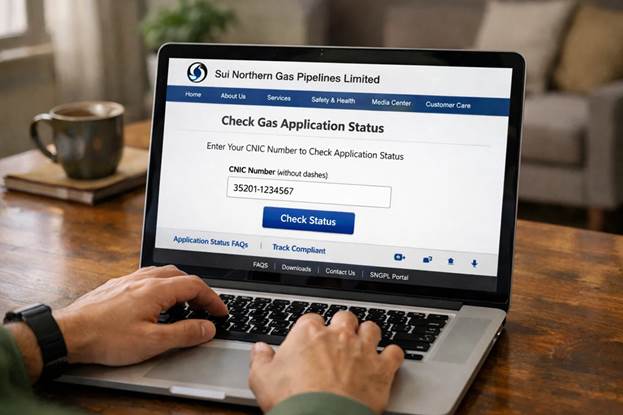
Every year millions of households in Pakistan apply for a new SUI gas connection, especially in Punjab, Khyber Pakhtunkhwa, and northern regions served by Sui Northern Gas Pipelines Limited (SNGPL). According to official reports, SNGPL supplies natural gas to over 7 million consumers across Pakistan, and thousands of new applications are processed every month. Because of this high demand, many applicants want to know how to check their SUI gas application status online using CNIC .
The good news is that the government and gas utilities have made the process easier through online portals, SMS services, and digital bill verification systems. This guide explains how to check your SUI gas application status online, verify your gas bill, and apply for a new connection in simple steps.
Understanding the SUI Gas Connection System in Pakistan
Before checking your application status, it helps to understand how the system works.
Pakistan has two major natural gas distribution companies:
| Gas Company | Coverage Area | Main Services |
| SNGPL | Punjab, KPK, Islamabad, Azad Kashmir | Domestic and commercial gas supply |
| SSGC | Sindh and Balochistan | Gas supply and billing services |
Most people searching for “SUI gas application check online” are referring to SNGPL services, because the company serves the most populated regions of Pakistan.
When someone applies for a new connection, the application goes through several stages:
- Application submission
- Verification of documents
- Demand notice issuance
- Payment confirmation
- Installation queue
Checking the application status online allows applicants to know which stage their request has reached.
How to Check SUI Gas Application Status by CNIC
The easiest way to check your application progress is through the official SNGPL online system.
Step-by-Step Method
- Visit the official SNGPL website
- Go to the Application Tracking or New Connection Status section
- Enter your CNIC number or application number
- Complete the captcha verification
- Click Check Status
Within seconds, the system will show the current progress of your application.
This method works for most domestic gas connection applications submitted in recent years. If your application is very old, the data may appear through the application number instead of CNIC.
Common Status Messages You May See
When you check your SUI gas application online, the system usually displays one of several status messages.
| Status Message | Meaning |
| Application Received | Documents submitted successfully |
| Under Process | Verification in progress |
| Demand Notice Issued | Payment required before installation |
| Payment Verified | Waiting for installation |
| Connection Installed | Gas connection completed |
Understanding these messages helps applicants know exactly what action they must take next.
For example, if the status shows Demand Notice Issued, you must pay the required fee before installation can begin.
How to Check SNGPL Gas Bill Status Online
Another common search is how to check gas bill status online, especially when customers lose their printed bill.
SNGPL provides a digital bill system where you can verify your monthly charges.
Online Gas Bill Check Method
Follow these steps:
- Visit the SNGPL online bill inquiry page
- Enter your consumer number
- Click Submit
The website will display:
- Current bill amount
- Due date
- Billing month
- Previous balance
Customers can also download and print a duplicate gas bill directly from the portal.
This feature helps avoid late payments and service interruptions.
How to Apply for a SUI Gas Connection in Pakistan
If you have not yet applied for gas, you must submit a new connection request.
The process typically requires several documents.
Required Documents
- Copy of CNIC
- Property ownership proof or rent agreement
- Neighbor’s gas bill copy (for location reference)
- Application form
- Security deposit
Applicants can submit these documents online or through the nearest SNGPL customer service center.
After submission, the company issues an application number, which you can use later for tracking.
Estimated Fees for New Gas Connection
Gas connection fees depend on several factors, including connection type and pipeline availability.
Here is a general overview.
| Connection Type | Estimated Fee (PKR) | Notes |
| Domestic connection | 7,000 – 10,000 | Standard household connection |
| Commercial connection | 20,000+ | Depends on business category |
| Industrial connection | Higher charges | Requires approval and inspection |
These figures may change based on government policy and infrastructure costs, so applicants should verify the latest rates from official SNGPL sources.
Why Gas Applications Take Time in Pakistan
Many applicants worry when their status remains unchanged for months.
There are several reasons for delays.
High Demand
Pakistan faces a large gap between gas demand and supply, especially in winter.
Infrastructure Expansion
Some areas require new pipelines before connections can be installed.
Verification Process
Authorities verify property ownership and application details before approval.
Because of these factors, waiting lists for domestic gas connections can sometimes extend several months or even years in high-demand regions.
Offline Methods to Check SUI Gas Application Status
Although online tracking is the easiest method, some applicants prefer offline verification.
You can also check your status through:
- SNGPL customer service centers
- Official helpline
- Regional offices
Provide your CNIC number or application number, and staff will verify your application progress.
This method is useful for applicants who submitted their forms manually before online systems became common. You can also check HAZECO Bill Check online using above method.
Tips to Avoid Problems With Gas Applications
Many delays occur because of incomplete applications.
Here are practical tips.
Submit Accurate Documents
Make sure your CNIC number and property information match official records.
Keep Your Application Number Safe
The application number is the primary reference for status tracking.
Pay Demand Notice Quickly
Once the demand notice is issued, paying the fee promptly helps move your request into the installation queue.
These small steps can significantly reduce waiting time.
Frequently Asked Questions
How do I check my SUI gas application status by CNIC?
Visit the official SNGPL website and open the application tracking page. Enter your CNIC or application number to view the status.
How to check gas bill status online?
Use the SNGPL online bill inquiry system and enter your consumer number. The system will show your current bill and payment details.
How to apply for SUI gas connection?
Submit an application with required documents through the SNGPL portal or at a customer service center. After submission, you will receive an application number for tracking.
How to check SNGPL bill status online?
Go to the SNGPL bill inquiry page and enter your consumer number to view or download your duplicate bill.
Checking SUI gas application status online has become much easier in recent years. With CNIC-based verification, digital billing systems, and online tracking portals, applicants can now monitor their gas connection requests without visiting offices repeatedly.